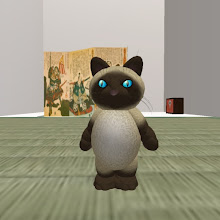
While my laptop guts get fixed (I curse Nvidia up to the 7th generation), I try to keep my hand warn with some photoshop tricks. From a picture of a building made to celebrate Halloween @ Virtual Ability, I adjusted the lighting, added some lightning, and played with some blurring. Intersting?...
Showing posts with label Photo. Show all posts
Showing posts with label Photo. Show all posts
Wednesday, October 15, 2008

Monday, July 21, 2008
Tales of the arabian SL nights
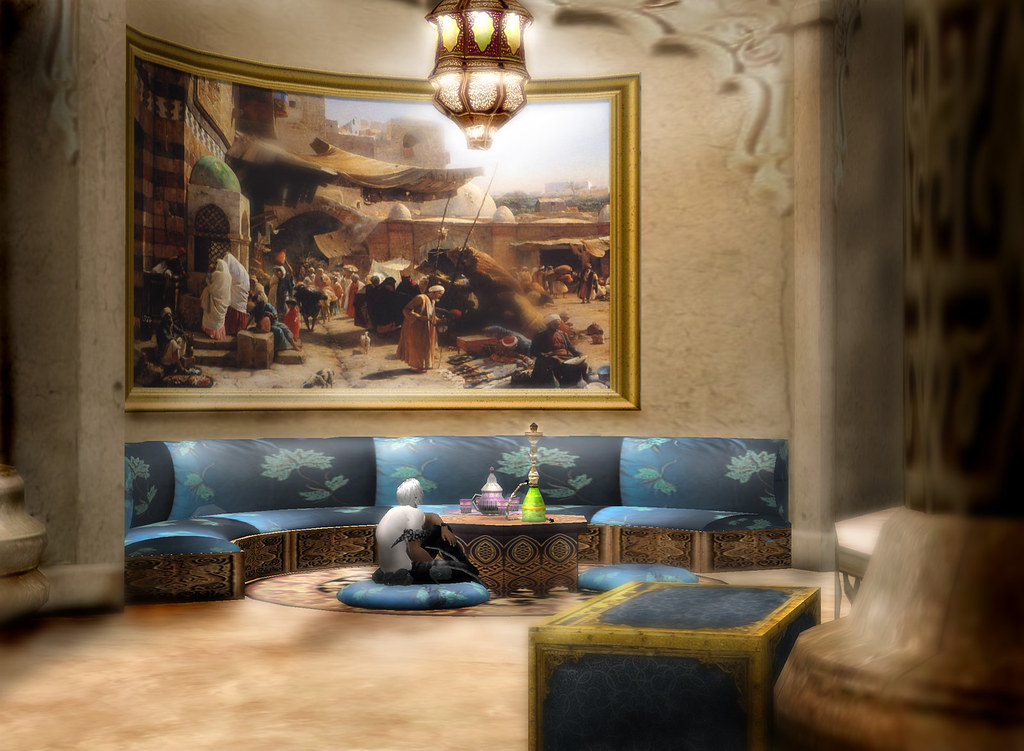 My oh my, what a beautiful place I just discovered. I always feel idiot when I see such places, I tell myself 'what a waste of time, why did you not discover this place before?'.
Kingdom of Sands is an RP arabian/persian themed sim. Needless to say (ahem, based on the picture above ^^) it is one of the most awesome places in second Life.
Again, more to come later :)...
Monday, June 30, 2008
Cyberpunk Sims...Insilico

There are a few cyberpunk themed sims ISL. Midian city is one of the most famous. But this is not the one that held my attention. I discovered Insilico (find it thru the search engine you lazy visitor). General design sticks even more to Blade Runner atmosphere. This first pic shows how sense of detail is important. This motorbike is a prim extravaganza. More to come soon!
Thursday, May 29, 2008
Elysium strikes again...
... with another brilliant photograph illustrating a tat.
Although the photo commemorates a sad moment of her life, I have to compliment her for the artwork.
Great job!
Photo following the jump.
Although the photo commemorates a sad moment of her life, I have to compliment her for the artwork.
Great job!
Photo following the jump.
Monday, May 26, 2008
Rust: how to kill a big steel guy

Walking around the new Relic for Windlight (The new Relic), I saw a nice pose ball that gave me an idea for a photograph.
As a kid, I liked the super hero drama mythology (I understood later Marvel took it all from the Greeks &Romans, tsss tss).
Generally, it is all about desperate love and (violent sometimes) death.
This pose ball was also the opportunity to wear this great and so desired IRL (^^) Iron Man outfit.
About the photo, I just added a bit of rust to make it more in line with the idea I had of something tragic.
The rest is all Windlight... ok, maybe not the glow of light emanating from his chest.
Monday, April 7, 2008
Holidays!

The skin project showed me two things:
1 - designing skins is not simple (yeah I know...)
2 - even ISL, you need 'holidays', some time you can do silly things, have fun, stop thinking to birth marks, scars, skin tone, hairs, ...
So these were and are for a little time my SL holidays: sailing!
I bought a Flying Fizz I have a lot of fun with. Of course, as usual and as many, I wanted to customize it to my colors and logo, and so I spend a bit more time on illustrator and photoshop to do so. But now it really looks like MY boat! :)
... oh Geez, I am 7 year old...
Wednesday, February 13, 2008
Distance far away

Nothing very orginal here, as almost everyone ISL went to this place to make a more or less romantic picture.
Just an opportunity to make a more 'authentic' sepia tinting picture.
Still, this place is great, well designed, and supports a true charity SL to RL project.
So TP to 'the far away' and buy your acre of wheat field!
Tuesday, January 22, 2008
This no sepia

This path to the White House at Midnight Lotus is really beautiful.
Stairs, waterfall, trees, rocks, all the elements are placed with harmony.
So I took a picture of it, and tried a few effects to 'wash' some colors and make it older.
This no sepia photo, but sepia tinting is definitely part of the game. Wha resisted the most is the big kakemono with the logo. Red is definitely strong here.
And by the way, please buy my tattoos at the Lotus, 'cause as you can see on the picture, I kinda ruined myself at Moderno.
Friday, January 11, 2008
A more Seductive Mata Hari
Let's move on with our portrait 'photographs' (hehe) and see what we can get from a new picture of our dedicated cute pose volunteer Viola :)

This picture come from the same series I made of her for her first profile photo (link here).
To have less subject distortion, I close my camera angle. The result is a more realistic face shape with normal proportions.
In motion, the standard SL camera angle is not disturbing,as it gives us a better view on left and right. Extremely useful when shopping :).
For a full body or face photograph, the result can be disastrous, especially if you make a close up and your camera is not horizontal.
I really like this photo because of the composition, the angle, the pose of the model, and the way she is looking at the camera.
The result gives a feeling of mystery and seduction. Because the camera is over her, we feel like we dominate the character, but the fact she is not gacing us, and the way she is looking at us send some sort of challenge message : 'are you really sure you are going to win this one?' she seems to say.
So now, let's try to enhance this image.
I won't spend lines to describe what I do but here is the aim of the photoshop job:
- detach Viola from the background
- highlight face / eyes / left hand
- boost hair color a little
- add some 'mystery' diffuse glow :)
This said, after some photo torturing Potter witchcraft, here is the result.
To me, a better color composition than the previous work I have done, her skin is not 'burned' (sorry V., I won't take pictures with a flame thrower any more again).


This picture come from the same series I made of her for her first profile photo (link here).
To have less subject distortion, I close my camera angle. The result is a more realistic face shape with normal proportions.
In motion, the standard SL camera angle is not disturbing,as it gives us a better view on left and right. Extremely useful when shopping :).
For a full body or face photograph, the result can be disastrous, especially if you make a close up and your camera is not horizontal.
I really like this photo because of the composition, the angle, the pose of the model, and the way she is looking at the camera.
The result gives a feeling of mystery and seduction. Because the camera is over her, we feel like we dominate the character, but the fact she is not gacing us, and the way she is looking at us send some sort of challenge message : 'are you really sure you are going to win this one?' she seems to say.
So now, let's try to enhance this image.
I won't spend lines to describe what I do but here is the aim of the photoshop job:
- detach Viola from the background
- highlight face / eyes / left hand
- boost hair color a little
- add some 'mystery' diffuse glow :)
This said, after some photo torturing Potter witchcraft, here is the result.
To me, a better color composition than the previous work I have done, her skin is not 'burned' (sorry V., I won't take pictures with a flame thrower any more again).

Tuesday, January 8, 2008
Profile photo
Thanks to all the blogs about SL, I discovered that people use and overuse a photoshop technique to enhance photos they publish on flickr. Yes I know, I am dumb, but I can't know everything about everything :).
This magic filter is diffuse glow. I used it yesterday on the midian picture I took and you can see it is pretty effective to 'dramatize' a photograph.
So today, I try that on a profile picture project I started with a friend. To preserve her privacy (she might not appreciate I publish 'tortured' visuals of her face), I will name our subject 'Viola' :).
The aim is to create for her not only one profile picture but a set of different profile pics expressing several moods.
Needless to mention she had to sell an eye and half a kidney to pay me for that.
Today, we'll try to express a bit of mistery with our subject.
Lets' start with a photo! The lady gets her fav clothes, jewelry, tat, makeup on....
ok , shoot!
 All right, pretty decent picture. I took it as I liked the neutral face expression and the 'evasive' eye direction. We can then ask ourselves 'What is she looking at? a friend? An enemy? Is there danger?'.
The idea of mistery is more present because of the background behind. The screen and the cushion make a colorful composition that is not obvious.
We will separate them from the foreground with some nice blur.
Then, we will put some lighting to strenghten light direction and highlight our subject (aka international feale of mistery).
FInally a bit of diffuse glow to turn Viola into a source of light that will attract our eye.
 There.
In blog life, it took one minute and two lines. In Photoshop life, it took a bit more :).
Auto-criticism: diffuse glow gives a boost to the face, that's a fact. It almost makes the face 'surreal'. The bad side of such work is that it 'burns' the skin a bit, as Windlight (booh) does. I also enhanced the hair, the original was too dark to me.
Still, I think we now have a pretty good picture of Mata Hari asking herself how she could get more secrets from this austrian-hungarian ambassador.
To be continued...
This magic filter is diffuse glow. I used it yesterday on the midian picture I took and you can see it is pretty effective to 'dramatize' a photograph.
So today, I try that on a profile picture project I started with a friend. To preserve her privacy (she might not appreciate I publish 'tortured' visuals of her face), I will name our subject 'Viola' :).
The aim is to create for her not only one profile picture but a set of different profile pics expressing several moods.
Needless to mention she had to sell an eye and half a kidney to pay me for that.
Today, we'll try to express a bit of mistery with our subject.
Lets' start with a photo! The lady gets her fav clothes, jewelry, tat, makeup on....
ok , shoot!
 All right, pretty decent picture. I took it as I liked the neutral face expression and the 'evasive' eye direction. We can then ask ourselves 'What is she looking at? a friend? An enemy? Is there danger?'.
The idea of mistery is more present because of the background behind. The screen and the cushion make a colorful composition that is not obvious.
We will separate them from the foreground with some nice blur.
Then, we will put some lighting to strenghten light direction and highlight our subject (aka international feale of mistery).
FInally a bit of diffuse glow to turn Viola into a source of light that will attract our eye.
 There.
In blog life, it took one minute and two lines. In Photoshop life, it took a bit more :).
Auto-criticism: diffuse glow gives a boost to the face, that's a fact. It almost makes the face 'surreal'. The bad side of such work is that it 'burns' the skin a bit, as Windlight (booh) does. I also enhanced the hair, the original was too dark to me.
Still, I think we now have a pretty good picture of Mata Hari asking herself how she could get more secrets from this austrian-hungarian ambassador.
To be continued...
Monday, January 7, 2008
Happy New Year!

Ok things to do for 2008:
- eat less
- more sport
- shop less
- create more
- talk less
- act more
Hmmm, I can already say I'll do that when hell freezes... Woosh, it reached Midian CIty.
Amazing what you can say with a picture?
Just a few settings and brushes, to move from the icy, cold, frightening picture above to the colorful, warm, Christmas like picture below.
(things to do for 2008: improve Photoshop skills).

Friday, December 14, 2007
Xmas in Midian
People in Midian City have once again made a great job.
As winter approaches, they retextured streets with some snow, added some ice stalactites over the shops covers, and placed snow men here and there.
I'm still searching for an uzzi-equipped santa claus, after all, it's Midian city.
Thursday, December 13, 2007
Xmas in Bahamas

I was traveling from a beach to another yesterday and I discovered this really well designed club.
And when I say 'well designed', I mean original, with quality building, seamless textures, and also polite people.
Bonus: Xmas tree on the sea :)
Take a look at Laguna beach club
Tuesday, December 4, 2007
Windlight @ Kenroku: when night comes

Time to go home and light up a candle... And for miss V., back to black hair :)
Monday, December 3, 2007
Windlight @ Kenroku: holly buddha!


I finally found time to install windlight latest release and run it. I seized this opportunity to visit a place called Kenroku.
Needless to say that I liked this place a lot :), and I also appreciated the new rendering by windlight.
With this new client, I am a little bit like a baby with a new toy, want to play with it without knowing all the features.
True: the sunsets are just speechless.
True: local lights look better
True: skin textures look a bit 'burned'
So, here are the first pictures, no added FX.
Oh by the way, let's advertize a bit :) : This 'très joli' hakama that I wear was found at House of Shaea (don't be lazy and type it in the search engine).
And to finish, Some contextual music to improve the effect :)

Wednesday, November 28, 2007
Photo: Have a walk in Midian City...
 ... and discover this really great cyber-punk designed sim. I took this photograph as I was waiting for a friend who had ODed chrimp tempuras.
It is a dark sim, 'but' Photoshop can help make it even darker.
TP following this link
Friday, November 23, 2007
Photo: The Pond

A bit of narcissic work: me, myself and I posing for me, myself and I.
I took the shot at my place (did I tell you I was lazy?) and photoshopped it a bit to soften some curves and add the distance effect. Actually, I already had closed the angle for the snapshot, but it still needs some additional blurring to make it more real.
Thursday, November 22, 2007


Wednesday, November 21, 2007
'Sweetest Perfection' tattoo collection ad #2
 Another ad for the new collection. Viola was kind and brave enough to show us errr... another side of her personnality. I think this girl rocks! :)
'Sweetest Perfection' tattoo collection ad #1

The decor set has been taken at Zyba (or is it Zyba's), a very nice marocco style club.
The SL search engine will give you the place :)
Subscribe to:
Posts (Atom)